
99ExCh Account Recovery
Recover Your Account • Reset Password • OTP Verification • Login Help
Recover your 99ExCh account if you’ve forgotten your password, lost access to your registered mobile number, or are experiencing login issues. This complete guide explains password reset, OTP verification, account recovery, and secure access in a few simple steps.
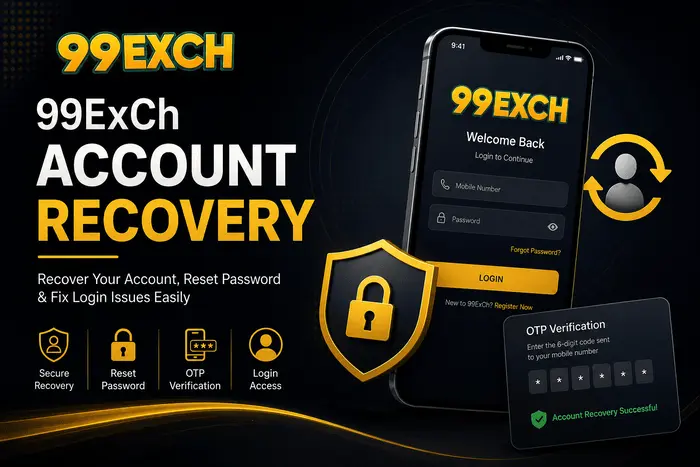
Table of Contents
- What Is 99ExCh Account Recovery?
- When Do You Need Account Recovery?
- Common Login Problems
- How to Recover Your 99ExCh Account
- How to Reset Your Password
- OTP Verification & Mobile Recovery
- Account Recovery Tips
- Common Recovery Problems & Solutions
- Website vs App Account Recovery
- Security Tips After Account Recovery
- FAQs
What Is 99ExCh Account Recovery?
Learn what 99ExCh account recovery is, when you may need it, and how it helps restore secure access to your account.
99ExCh Account Recovery is a security process that helps you regain access to your account if you are unable to log in. Whether you have forgotten your password, are not receiving the OTP, or cannot access your registered mobile number, the recovery process verifies your identity before allowing you to reset your login credentials.
The recovery system is designed to protect user accounts from unauthorized access while making it easy for genuine users to restore access. After successful verification, you can create a new password and continue using your account without creating a new registration.
Most account recovery requests are completed through mobile number verification and OTP confirmation. Keeping your registered mobile number active and using accurate account details can make the recovery process faster and more secure.
When Do You Need Account Recovery?
Find out the most common situations where the 99ExCh account recovery process can help you regain secure access.
You may need 99ExCh Account Recovery whenever you are unable to access your account through the normal login process. Instead of creating a new account, recovering your existing account allows you to keep your registered information and continue using the same account securely.
The most common reason is forgetting your account password. If you cannot remember your login credentials, you can verify your identity using your registered mobile number and OTP before creating a new password.
Account recovery is also useful when you are not receiving the verification OTP, have changed your mobile device, or accidentally entered incorrect login details multiple times. Completing the verification process helps confirm that you are the legitimate account owner.
If your account becomes temporarily inaccessible due to security verification or login issues, following the official recovery process is the safest way to restore access without risking your account information.
Common Login Problems
Before starting the recovery process, identify the reason you cannot access your 99ExCh account. Knowing the exact issue helps you choose the correct recovery method.
Users may experience login problems for different reasons. In most cases, these issues can be resolved by verifying your account details, resetting your password, or completing the OTP verification process.
If the problem continues after following these basic checks, continue with the official account recovery process explained in the next section to regain access safely.
How to Recover Your 99ExCh Account
Follow these simple steps to recover your 99ExCh account securely and regain access to your existing account.
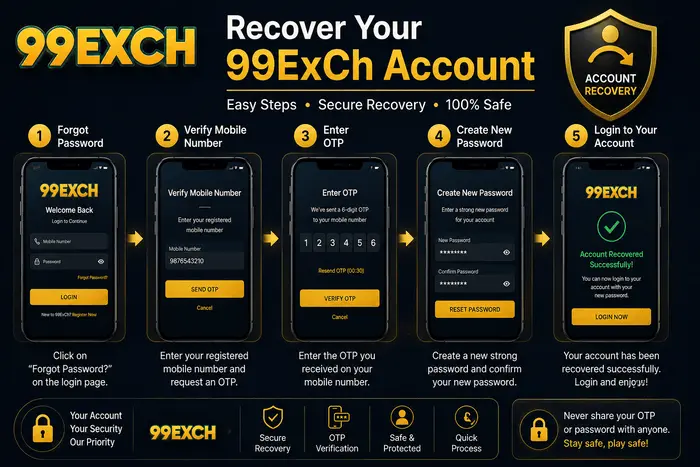
If you have forgotten your password or cannot log in, you can recover your 99ExCh account by verifying your registered mobile number and resetting your password. The entire recovery process takes only a few minutes when your registered details are available.
Visit the Official Login Page
Open the official 99ExCh Login page and click on the Forgot Password or Account Recovery option.
Enter Your Registered Mobile Number
Provide the same mobile number that you used while registering your 99ExCh account.
Verify the OTP
Enter the One-Time Password (OTP) received on your registered mobile number to verify your identity.
Create a New Password
Set a strong password using a combination of letters, numbers, and special characters to improve account security.
Log In to Your Account
Return to the login page and sign in using your newly created password to regain full access to your account.
If you cannot receive the OTP, no longer have access to your registered mobile number, or continue facing login issues, contact the Official 99ExCh Support for account verification and recovery assistance. Avoid creating a duplicate account, as it may delay the recovery process.
How to Reset Your 99ExCh Password
Resetting your 99ExCh password is simple once your identity has been verified. Creating a strong password also helps protect your account from unauthorized access.
After successfully completing the OTP verification process, you’ll be prompted to create a new password. Make sure your new password is different from your previous one and difficult for others to guess. A strong password significantly improves your account security.
- Use a combination of uppercase letters, lowercase letters, numbers, and special characters.
- Avoid using your name, mobile number, or date of birth as your password.
- Never reuse passwords from other websites or applications.
- Store your password securely and never share it with anyone.
- Log in using your new password after the reset process is complete.
Once your password has been changed successfully, your old password will no longer work. Always use the new password for future logins and keep it confidential to maintain account security.
OTP Verification During Account Recovery
OTP verification is an important security step that confirms you are the genuine owner of your 99ExCh account before allowing a password reset.
During the account recovery process, an OTP (One-Time Password) is sent to your registered mobile number. You must enter the correct verification code to continue with password recovery. This additional security layer helps prevent unauthorized users from accessing your account.
If the OTP does not arrive immediately, wait a few moments and ensure your mobile network is active. You should also verify that the registered mobile number is available to receive SMS messages. Avoid requesting multiple OTPs repeatedly, as this may temporarily delay the verification process.
- Keep your registered mobile number active and accessible.
- Enter the OTP exactly as received without adding extra spaces.
- Never share your OTP with anyone, including individuals claiming to be support representatives.
- If the OTP expires, request a new verification code and use the latest one only.
- Make sure your mobile device has a stable network connection before requesting another OTP.
If you continue experiencing OTP verification problems or cannot access your registered mobile number, contact the Official 99ExCh Support for identity verification and further assistance.
Tips to Recover Your 99ExCh Account Faster
Keeping your account information updated and following the correct recovery process can help you regain access quickly while avoiding unnecessary delays.
Most account recovery requests are completed without issues when users provide accurate registration details. Before starting the recovery process, ensure you have access to your registered mobile number and use only the official recovery method.
- Always use the mobile number linked to your 99ExCh account.
- Keep your internet connection stable throughout the recovery process.
- Check your SMS inbox carefully before requesting another OTP.
- Create a unique password that you have never used before.
- Do not attempt multiple recovery requests within a short period.
- Use only the official login page and official support channels.
- Update your password immediately if you believe your account has been accessed by someone else.
Following these recommendations can reduce recovery time and improve the security of your 99ExCh account. If you still cannot regain access, contact the Official 99ExCh Support for further assistance.
Common 99ExCh Account Recovery Problems and Solutions
Users may occasionally face issues while recovering their 99ExCh account. Most of these problems can be resolved by following the correct troubleshooting steps.
| Problem | Possible Solution |
|---|---|
| OTP Not Received | Wait a few minutes, check your mobile network, and request a new OTP if required. |
| Forgot Registered Mobile Number | Contact the Official 99ExCh Support team for identity verification. |
| Incorrect OTP | Enter the latest OTP exactly as received and avoid using expired verification codes. |
| Password Reset Failed | Refresh the page and repeat the recovery process using the latest verification code. |
| Account Still Inaccessible | Reach out to the Official Support team for manual account verification. |
Most recovery issues are caused by incorrect account details, expired OTPs, or temporary network problems. Before trying again, verify that your registered mobile number is active and that you are following the official recovery process.
If none of the above solutions resolve your issue, contact the Official 99ExCh Support. The support team can verify your account and guide you through the remaining recovery steps.
Website vs App Account Recovery
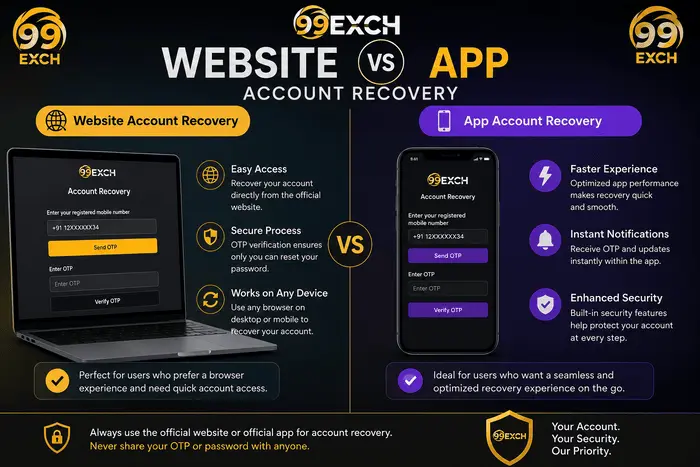
You can recover your 99ExCh account through either the official website or the official mobile app. Both methods use the same verification process, but the overall experience differs depending on the device and platform you choose.
Both recovery options require your registered mobile number and OTP verification before you can reset your password. Your account information, balance, and settings remain unchanged regardless of whether you recover your account from the website or the mobile app.
| Feature | Website Recovery | App Recovery |
|---|---|---|
| Access Method | Use any desktop or mobile browser. | Use the official 99ExCh mobile app. |
| Installation | No installation required. | Requires the official app to be installed. |
| OTP Verification | Required before password reset. | Required before password reset. |
| Password Reset | Create a new password after verification. | Create a new password after verification. |
| Supported Devices | Desktop, laptop, tablet, and mobile browsers. | Android devices with the official app. |
| Recovery Speed | Depends on browser performance and internet connection. | Generally quicker for users already using the app. |
| Security | Official website with OTP verification. | Official app with OTP verification. |
| Best Choice | Ideal for users without the mobile app. | Best for regular app users. |
If you have access to the official mobile application, recovering your account through the app can be more convenient. However, users who are on a computer or have not installed the app can complete the same recovery process securely through the official website without any loss of functionality.
- Both methods require your registered mobile number.
- OTP verification is mandatory before creating a new password.
- Your account data remains the same regardless of the recovery method.
- Always use official recovery channels to protect your account.
Recover your account only through the official website or official mobile application. If you’re unable to complete the recovery process, contact the Official 99ExCh Support for secure account verification and assistance.
Security Best Practices After Account Recovery
Recovering your account is only the first step. Following good security practices helps protect your 99ExCh account from unauthorized access in the future.
Once you’ve successfully recovered your 99ExCh account, take a few minutes to improve its security. Simple precautions can significantly reduce the risk of losing access again or exposing your account to unauthorized users.
- Create a strong password using uppercase and lowercase letters, numbers, and special characters.
- Never share your password or OTP with anyone, even if they claim to represent 99ExCh support.
- Use only the official website and official mobile application to log in to your account.
- Update your password immediately if you notice any unusual login activity.
- Avoid logging in from public computers or unsecured Wi-Fi networks.
- Always log out after using a shared or public device.
- Keep your registered mobile number active so you can receive OTPs whenever needed.
- Contact official support immediately if you believe your account has been compromised.
A secure password, an active registered mobile number, and careful handling of OTP verification are the most effective ways to keep your 99ExCh account protected after recovery.
Security Tip: Official 99ExCh representatives will never ask for your password or OTP. If anyone requests these details, do not share them and report the incident through the Official 99ExCh Support.
Frequently Asked Questions About 99ExCh Account Recovery
Find answers to the most common questions about recovering your 99ExCh account, resetting your password, and resolving login issues.
Visit the official login page, select the account recovery or forgot password option, verify your registered mobile number with an OTP, and create a new password to regain access.
Wait a few minutes, check your mobile network, and request a new OTP if necessary. If the issue continues, contact the Official 99ExCh Support.
If you no longer have access to your registered mobile number, you’ll need assistance from the official support team to verify your identity before your account can be recovered.
Yes. Both the official website and the official mobile app use the same OTP verification and password reset process to recover your account securely.
In most cases, account recovery takes only a few minutes if you have access to your registered mobile number and complete the OTP verification successfully.
Yes. Recovering your account only restores access. Your account information and available balance remain unchanged after successful verification.
Recover Your 99ExCh Account Safely and Securely
Recovering your 99ExCh account is quick when you follow the official process and keep your registered mobile number accessible for OTP verification.
Whether you’ve forgotten your password, lost access to your account, or are experiencing login issues, the official account recovery process helps you regain access securely. By following the steps explained in this guide and using only official recovery channels, you can reset your password without risking your account security.
Always protect your login credentials, never share your OTP with anyone, and avoid unofficial websites or applications. If you’re unable to recover your account using the standard recovery process, the official support team can assist you after verifying your identity.
Need help recovering your account? Visit the Official 99ExCh Login page to begin the recovery process or contact the Official 99ExCh Support for further assistance.
Quick Reminder: Use only the official 99ExCh website, official mobile application, and verified support channels for account recovery. Following the correct recovery process helps keep your account secure and prevents unauthorized access.